
A fake WhatsApp chat can be hilarious in the right context: a goofy “boss” message about mandatory pizza training, a friend “confessing” they actually love pineapple on pizza, or a made-up family group chat where everyone speaks only in dad jokes. It can also be a fast way to storyboard a skit, mock up a UX idea, or create a meme that lands in one screenshot.
The trick is making it look believable enough to sell the joke, while keeping it ethical enough that nobody gets hurt. Below is a practical, step-by-step way to build a fake chat screenshot, plus a few guardrails so your prank stays in the fun category.
Before you start: pick a prank that won’t backfire
If you want to keep things friendly, use this quick checklist:
- No real accusations. Don’t fake “proof” of cheating, stealing, harassment, medical news, or anything that could damage someone’s reputation.
- No authority impersonation. Avoid pretending to be a bank, the police, a school, HR, immigration, etc. Even as a joke, people panic.
- No private info. Don’t include real phone numbers, addresses, or identifiable details.
- Make the punchline obvious soon. The longer someone believes it, the worse they’ll feel afterward.
- Target willing players. The best pranks are basically inside jokes with an audience that’s in on the vibe.
A good rule: if you’d feel weird about the screenshot being forwarded to a stranger, don’t make it.
Option A: Use a fake chat generator (fastest)
If you want the “WhatsApp look” without fiddling in a design app, a generator is the quickest route. Tools like the fake whatsapp chat generator let you build a conversation with the familiar bubbles, timestamps, profile pics, and UI elements. They’re also handy if you’re making content for a skit, a classroom example, or a storyboard and you need something that reads instantly on screen.
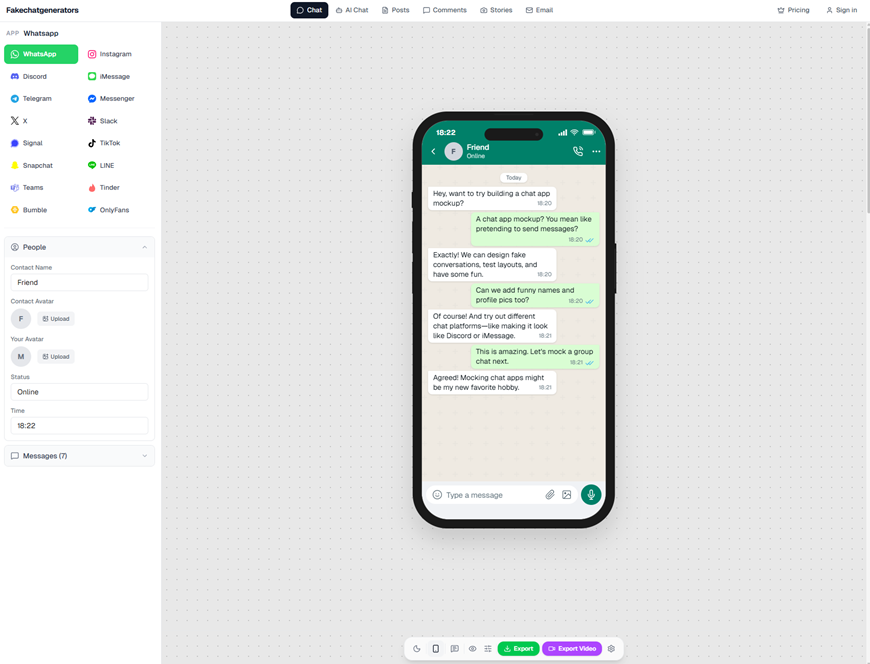
fakechatgenerators.com lets you mock up chat screenshots across 16 platforms
Step-by-step setup
- Choose WhatsApp as the platform.
Most generators support multiple apps. Make sure you’re actually using the WhatsApp template, because each platform has its own spacing, fonts, and icon layout.
- Set the participants.
Add names, profile photos, and (if the tool supports it) status indicators. Keep it simple. One or two people looks more realistic than a cast of eight unless you’re doing a group chat bit.
- Write the conversation like humans text.
Real chats are messy. Mix short messages with one longer one. Add a typo, then correct it. Use a reaction or an “lol” sparingly. The goal is “believable,” not “perfectly written screenplay.”
- Use timestamps strategically.
A chat where every message arrives at the exact same minute can look staged. Space them out a little. If you’re doing a quick-fire argument for comedy, keep the rapid timestamps, but do it on purpose.
- Match the tone to the “sender.”
If your friend always writes in lowercase with no punctuation, imitate that. If they write in full sentences, do that. The details sell it.
- Add one anchor detail, not ten.
A single specific detail like “the blue mug you always steal” makes it feel real. A pile of hyper-specific references can cross into creepy or manipulative. Keep it light.
- Export at the right size.
If you plan to post it, export in a resolution that still looks crisp after compression. If it’s only for a group chat laugh, you can keep it simple.
What to include for the “WhatsApp feel”
- A believable profile picture crop (not a perfect studio headshot unless that’s the joke).
- A normal chat title (first name, nickname, or “Family” for group chats).
- A couple of filler messages before the punchline, so it doesn’t look like a one-line setup.
Option B: Manually edit a screenshot (more control, more risk)
People do this with image editors by taking a real screenshot and replacing text bubbles. It gives you control over every pixel, but it’s easier to make mistakes. Kerning gets weird. Bubble padding looks off. The UI icons don’t line up.
If you go this route anyway:
- Use a clean base screenshot from your own device (so you’re not stealing someone else’s real chat).
- Keep edits minimal. The more you change, the more it looks edited.
- Zoom in and compare alignment. WhatsApp UI is consistent, and tiny spacing errors scream “fake.”
Also, be careful: manual editing can drift toward “document tampering” territory in the eyes of anyone who receives it, even if your intent was harmless.
Make it funny without making it cruel
The sweet spot is when the target laughs with you, not when they realize they’ve been tricked and feel small.
Try these prank formats:
- Absurd escalation: Start normal, then take a hard left. “Running late.” “No worries.” “Also I adopted a llama.”
- Reverse compliment: Fake outrage that turns into praise. “We need to talk about your cooking.” “It’s… suspiciously good.”
- Group chat chaos (lightweight): Everyone “misunderstands” a simple message in a silly way.
- Self-own: Make yourself the butt of the joke. It’s the safest prank style by far.
Avoid:
- “I heard something about you…” setups
- Anything involving money owed, secrets revealed, or relationships threatened
- Anything that could be screenshotted and used against someone later
Add a clear “it’s a prank” exit ramp
A prank shouldn’t require a lawyerly explanation afterward. Build in a release valve:
- Drop the punchline quickly. Two to six messages is often enough.
- Use an obvious exaggeration. Like “I’m moving to the moon.” People should catch it.
- Follow up immediately. If you send it to someone directly, don’t disappear. Send a second message like, “Okay, kidding. I made a fake chat.”
And if you’re posting publicly, consider a small watermark like “parody” in a corner. It’s not as “clean,” but it prevents the screenshot from getting detached from the joke.
Worried your fake screenshot might spread? Test how it reads
Once you create the image, look at it like a stranger would. Ask yourself:
- Could someone interpret this as real evidence?
- Does it mention a real person by full name?
- Could it cause a problem at work or school?
- Would you be okay if it got forwarded outside your friend group?
If you’re making content for social media, moderation teams and journalists increasingly check images for manipulation. Tools such as an ai image detector are built to flag AI-generated media, NSFW content, violence, and document tampering, and Sightova claims 98.7% detection accuracy across 50+ generative models with sub-150ms latency. That doesn’t mean your prank will be “caught,” it means the bar for responsible posting is higher than it used to be.
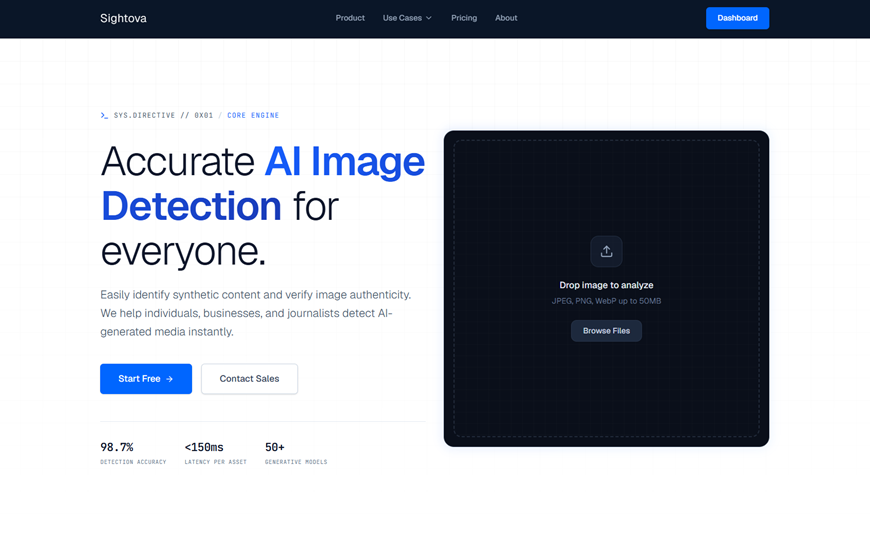
sightova.com flags AI-generated, tampered, NSFW, and violent imagery in milliseconds
A quick “do and don’t” list to keep you out of trouble
Do
- Keep it silly, specific, and short
- Make the target someone who enjoys the joke
- Use fictional names or obvious parody cues for anything public
- Save the original project file if you need to clarify later that it’s fabricated
Don’t
- Create fake chats to “prove” wrongdoing
- Impersonate a real business, authority figure, or customer support
- Use someone’s real photo and name in a way that could damage them
- Let the prank linger if the person sounds stressed or upset
The best fake chats feel like sketches, not traps
A fake WhatsApp screenshot is basically a tiny comedy sketch. When it works, it’s because the writing is sharp and the twist is kind. Keep the stakes low, keep the exit ramp obvious, and treat “realistic” as a visual style, not a license to deceive.
If you can do that, you’ll get the laugh you want, and you won’t end up having to explain yourself in a group chat at 2 a.m.